As an Amazon Associate, we earn from qualifying purchases. Some links on this site are affiliate links at no extra cost to you. Our recommendations are based on thorough research and editorial judgment.

10 Best USB-A Flash Drives You Can Actually Trust With Your Files

You’ll find reliable USB-A flash drives across multiple performance tiers: USB 2.0 models deliver 10–25 MB/s read speeds suitable for documents, while USB 3.1 controllers reach 400 MB/s writes for large media files. Capacities range from 8GB to 128GB, with metal unibody designs offering shock and water resistance. Warranty coverage spans one to five years, depending on manufacturer durability claims. Compatible across Windows, macOS, and Linux systems without software installation, these drives accommodate diverse storage needs through strategic capacity and interface selection. Understanding specific performance requirements and environmental specifications reveals best choices for your particular use cases.
Key Takeaways
- Metal unibody construction and shock/water resistance features ensure drives survive drops, impacts, and accidental liquid exposure reliably.
- USB 3.1 and 3.2 interfaces deliver 100–400 MB/s speeds, enabling fast, secure file transfers compared to older USB 2.0 drives.
- Capless swivel and retractable connector designs prevent cap loss and connector damage, protecting data access and drive longevity.
- Plug-and-play compatibility across Windows, macOS, and Linux without software installation ensures immediate usability across devices and operating systems.
- exFAT and NTFS file system support enables storage of individual files exceeding 4GB, critical for video and photo backups.
| 32GB Swivel USB 2.0 Flash Drive (Purple) |  | Budget-Friendly Pick | Storage Capacity: 32 GB | USB Interface/Speed Class: USB 2.0 | Read Speed: ~18 MB/s | VIEW LATEST PRICE | Read Our Analysis |
| ENUODA 128GB Swivel USB Flash Drive (1 Pack) |  | Best Value | Storage Capacity: 128 GB | USB Interface/Speed Class: USB 2.0 | Read Speed: 15–25 MB/s | VIEW LATEST PRICE | Read Our Analysis |
| Samsung BAR Plus 3.1 USB Flash Drive 128GB | 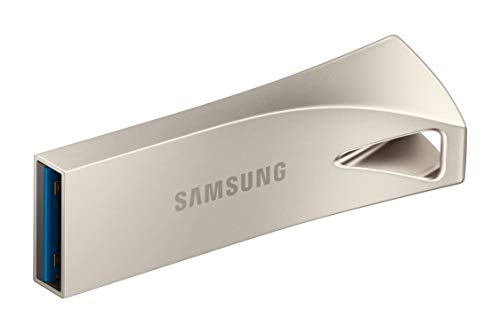 | Best Overall | Storage Capacity: 128 GB | USB Interface/Speed Class: USB 3.1/3.2 Gen 1 | Read Speed: Up to 300 MB/s | VIEW LATEST PRICE | Read Our Analysis |
| 64GB USB Flash Drive 3-Pack with LED Light |  | Best Multi-Pack | Storage Capacity: 64 GB (3-pack) | USB Interface/Speed Class: USB 2.0 | Read Speed: ~16–20 MB/s | VIEW LATEST PRICE | Read Our Analysis |
| RAOYI 5 Pack 64GB USB Flash Drive Memory Stick |  | Most Affordable Multipack | Storage Capacity: 64 GB (5-pack) | USB Interface/Speed Class: USB 2.0 | Read Speed: ≥12 MB/s | VIEW LATEST PRICE | Read Our Analysis |
| Aiibe 128GB USB 2.0 Flash Drive Memory Stick | 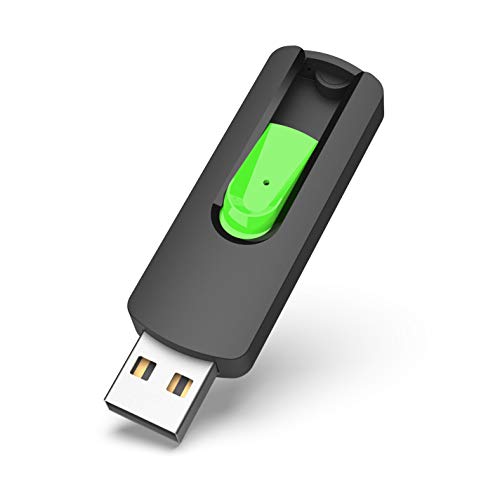 | Best Capacity | Storage Capacity: 128 GB | USB Interface/Speed Class: USB 2.0 | Read Speed: ≤25 MB/s | VIEW LATEST PRICE | Read Our Analysis |
| Maspen USB Flash Drive 32GB High Speed Thumb Drive | 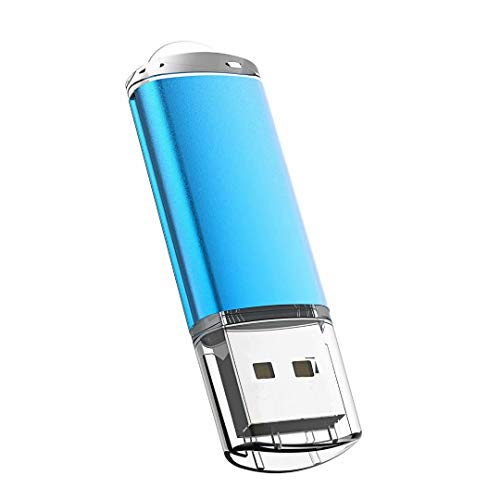 | Best For Students | Storage Capacity: 32 GB | USB Interface/Speed Class: USB 2.0 | Read Speed: ≤10 MB/s | VIEW LATEST PRICE | Read Our Analysis |
| 32GB USB Flash Drives 2 Pack with LED Light | 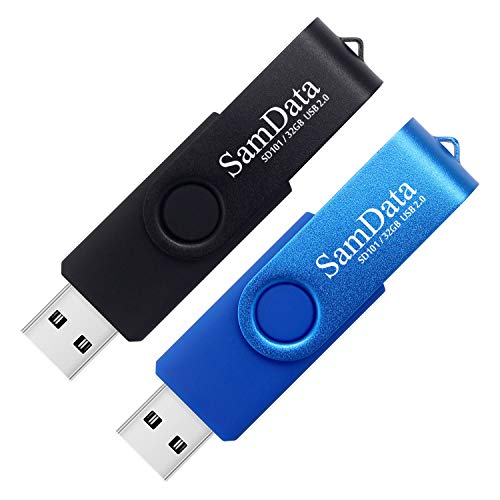 | Best Dual-Pack | Storage Capacity: 32 GB (2-pack) | USB Interface/Speed Class: USB 2.0 | Read Speed: Up to 18 MB/s | VIEW LATEST PRICE | Read Our Analysis |
| 5 Pack 8GB USB Flash Drive Memory Stick | 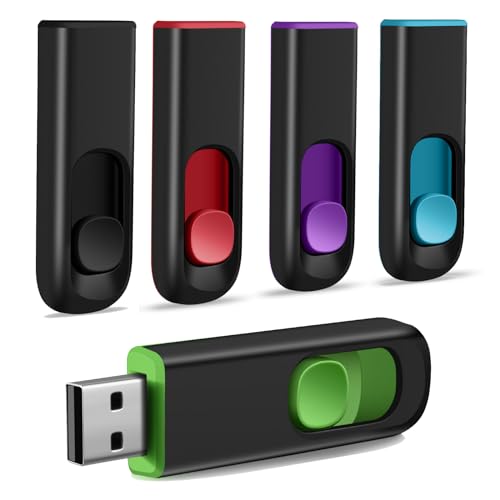 | Best Starter Pack | Storage Capacity: 8 GB (5-pack) | USB Interface/Speed Class: USB 2.0 | Read Speed: 6 MB/s | VIEW LATEST PRICE | Read Our Analysis |
| Lexar 64GB 3-Pack USB 3.2 Flash Drive (A30E) |  | Best Performance | Storage Capacity: 64 GB (3-pack) | USB Interface/Speed Class: USB 3.2 Gen 1 | Read Speed: Up to 100 MB/s | VIEW LATEST PRICE | Read Our Analysis |
You may be interested

More Details on Our Top Picks
32GB Swivel USB 2.0 Flash Drive (Purple)
The SIMMAX 32GB swivel flash drive serves users who require straightforward file storage and transfer without the inconvenience of lost caps, combining a capless swivel design with USB 2.0 connectivity that’s compatible with Windows 2000 through 10, Linux, and Mac OS systems. You’ll access read speeds of approximately 18 MB/s and write speeds reaching 60 MB/s, though actual available capacity measures 29.10 GB to 29.8 GB. The lightweight ABS plastic housing features a 360-degree rotating metal clip protecting the connector, while the one-year limited warranty covers manufacturer defects. This configuration supports data sharing across personal devices, professional environments, and collaborative workflows requiring cross-platform compatibility and reliable performance specifications.
- Storage Capacity:32 GB
- USB Interface/Speed Class:USB 2.0
- Read Speed:~18 MB/s
- Design/Protection Type:Swivel capless
- Operating System Compatibility:Windows, Mac, Linux
- Warranty:1-year limited product support
- Additional Feature:360° swivel metal clip design
- Additional Feature:Rubberized oil-skin finish body
- Additional Feature:Capless protection for connector
ENUODA 128GB Swivel USB Flash Drive (1 Pack)
If you’re transferring large files—high-resolution photos, HD videos, or extensive document collections—and you’d benefit from a portable storage solution that doesn’t require software installation, ENUODA’s 128GB swivel flash drive delivers plug-and-play functionality across Windows 98 through Windows 10, Linux, and Mac OS 10.3 systems. The device features USB 2.0 connectivity, achieving read speeds of 15–25 MB/s and write speeds of 7–12 MB/s, while its rotating metal clip design protects the connector from damage. Weighing merely 0.352 ounces with dust-proof construction, this lightweight drive accommodates keychain attachment and operates across PCs, laptops, televisions, and car audio systems equipped with USB ports.
- Storage Capacity:128 GB
- USB Interface/Speed Class:USB 2.0
- Read Speed:15–25 MB/s
- Design/Protection Type:Swivel with rotating clip
- Operating System Compatibility:Windows, Mac, Linux
- Warranty:Manufacturer warranty (details on product page)
- Additional Feature:LED indicator light included
- Additional Feature:Keychain ring attachment loop
- Additional Feature:Dust proof protective design
Samsung BAR Plus 3.1 USB Flash Drive 128GB
Samsung’s BAR Plus 3.1 delivers robust performance and durability for professionals, content creators, and users who regularly transfer large files across multiple systems. You’ll achieve read speeds up to 300 MB/s and write speeds of 400 MB/s, enabling efficient data transfers. The metal unibody construction withstands shock impacts up to 1,500 g, water immersion for 72 hours in seawater, temperature extremes from −25°C to 85°C, magnetic fields reaching 15,000 gauss, and X-ray exposure up to 50 Roentgen. Samsung’s five-year limited warranty, combined with in-house NAND and DRAM manufacturing, provides substantial long-term protection and reliability for your critical files.
- Storage Capacity:128 GB
- USB Interface/Speed Class:USB 3.1/3.2 Gen 1
- Read Speed:Up to 300 MB/s
- Design/Protection Type:Metal unibody with integrated keyring
- Operating System Compatibility:Windows, Mac, Linux (broad compatibility)
- Warranty:5-year limited warranty
- Additional Feature:Water resistant up 72 hours
- Additional Feature:Shock tolerance 1,500g rated
- Additional Feature:5-year limited warranty included
64GB USB Flash Drive 3-Pack with LED Light
SeeDete’s 64GB USB flash drive 3-pack delivers practical data storage for users requiring portable, multi-device backup solutions, offering three color-coded drives (black, red, blue) that enable efficient file organization across different purposes or locations. Each drive features USB 2.0 connectivity, 16–20 MB/s read speeds, and 7–10 MB/s write speeds, providing adequate performance for standard file transfers. The 360° rotating metal clip design with plastic shell protects the USB interface, while the keychains ring enhances portability. Factory-formatted in exFAT, the drives offer approximately 58.5GB usable capacity per unit, with 18-month warranty coverage and extensive customer support ensuring reliable long-term functionality.
- Storage Capacity:64 GB (3-pack)
- USB Interface/Speed Class:USB 2.0
- Read Speed:~16–20 MB/s
- Design/Protection Type:360° rotating metal clip
- Operating System Compatibility:Windows, Mac, Linux
- Warranty:18 months
- Additional Feature:3-pack multicolor bundle (black/red/blue)
- Additional Feature:360° rotating metal clip
- Additional Feature:LED transfer status indicator
RAOYI 5 Pack 64GB USB Flash Drive Memory Stick
The RAOYI 5 Pack 64GB USB Flash Drive stands out for users who need multiple storage solutions across different devices and environments, as the multipack configuration delivers five independent 64GB drives with mixed color options—black, red, blue, green, and purple—enabling organizational differentiation and simultaneous file transfers across separate computers, laptops, TVs, and automotive systems. Each drive features USB 2.0 connectivity, delivering read speeds of 12 MB/s and write speeds of approximately 5 MB/s, with exFAT formatting as the default file system. The retractable connector design, non-slip sliding switch, and lanyard hole accommodate various storage and transport scenarios, while plug-and-play compatibility eliminates software installation requirements across Windows, Mac, and Linux platforms.
- Storage Capacity:64 GB (5-pack)
- USB Interface/Speed Class:USB 2.0
- Read Speed:≥12 MB/s
- Design/Protection Type:Retractable capless connector
- Operating System Compatibility:Windows, Mac, Linux
- Warranty:Manufacturer product warranty
- Additional Feature:5-pack multicolor bundle included
- Additional Feature:Non-slip sliding switch design
- Additional Feature:Retractable capless connector protection
Aiibe 128GB USB 2.0 Flash Drive Memory Stick
For users prioritizing substantial storage capacity with broad device compatibility, Aiibe’s 128GB USB 2.0 flash drive delivers considerable data retention in a compact, lightweight form factor measuring 2.6 × 0.79 × 0.35 inches and weighing merely 0.247 ounces. The retractable USB Type-A connector provides interface protection during transport and storage. Read speeds reach 25 MB/s maximum, while write speeds achieve 12 MB/s, supporting exFAT formatting across Windows, Mac, Linux, and Unix systems. Plug-and-play functionality eliminates installation requirements, enabling immediate operation on desktops, notebooks, televisions, and automotive audio systems compatible with USB connectivity standards.
- Storage Capacity:128 GB
- USB Interface/Speed Class:USB 2.0
- Read Speed:≤25 MB/s
- Design/Protection Type:Retractable connector
- Operating System Compatibility:Windows, Mac, Linux, Unix
- Warranty:Manufacturer warranty
- Additional Feature:Retractable USB connector design
- Additional Feature:Factory tested and pre-formatted
- Additional Feature:Lightweight travel-friendly form factor
Maspen USB Flash Drive 32GB High Speed Thumb Drive
Maspen’s 32GB USB 2.0 flash drive serves users who need portable file storage with straightforward compatibility across multiple operating systems, since it works with Windows (2000 through 10), Mac OS, Linux, and Unix without requiring additional driver installation. The drive delivers read speeds up to 10 MB/s and write speeds of 8 MB/s, with factory formatting in FAT32 supporting files up to 4GB; reformatting to NTFS or exFAT enables larger file transfers. Its matte metal casing provides anti-fingerprint protection, while the protective cap shields the USB Type A connector during transport and storage.
- Storage Capacity:32 GB
- USB Interface/Speed Class:USB 2.0
- Read Speed:≤10 MB/s
- Design/Protection Type:Protective cap
- Operating System Compatibility:Windows, Mac, Linux, Unix
- Warranty:Seller customer service support
- Additional Feature:Matte metal anti-fingerprint casing
- Additional Feature:Red LED activity indicator light
- Additional Feature:Customizable unbranded logo option
32GB USB Flash Drives 2 Pack with LED Light
This dual-drive package delivers reliable data storage and transfer capabilities, making it an ideal choice for users who require portable, multi-device compatibility across Windows, Mac, and Linux operating systems. You’ll benefit from the capless swivel metal clip design, which rotates 360 degrees for convenient pocket storage. The LED indicator displays transfer status during file operations, while read speeds reach 18 MB/s and write speeds achieve 8 MB/s. Each 32GB drive operates across USB 2.0 interfaces, supporting temperatures from -30°C to 70°C. The FAT32 factory format guarantees broad compatibility, though NTFS compatibility remains limited on Mac systems. A 12-month warranty protects your investment against manufacturing defects.
- Storage Capacity:32 GB (2-pack)
- USB Interface/Speed Class:USB 2.0
- Read Speed:Up to 18 MB/s
- Design/Protection Type:Swivel metal clip capless
- Operating System Compatibility:Windows, Mac, Linux
- Warranty:12-month warranty
- Additional Feature:2-pack bundle (black/blue colors)
- Additional Feature:LED transfer status indicator light
- Additional Feature:12-month warranty with free guarantee
5 Pack 8GB USB Flash Drive Memory Stick
The MAKACTUA 5 Pack 8GB USB Flash Drive delivers practical data storage capabilities through five color-differentiated units—blue, red, green, purple, and black—enabling efficient file classification and visual organization across multiple users and workflows. You’ll find retractable USB Type-A connectors that protect against physical damage, combined with lanyard holes facilitating portable carry in pockets or bags. The drives operate at 6 MB/s read speeds with USB 2.0 backward compatibility across Windows, Linux, and Mac OS platforms, supporting images, videos, music, documents, and software files. Weighing 1.44 ounces collectively, these flash drives accommodate teachers, students, engineers, and professionals requiring dependable file transfer and data storage solutions across desktop computers, notebooks, televisions, and car audio systems.
- Storage Capacity:8 GB (5-pack)
- USB Interface/Speed Class:USB 2.0
- Read Speed:6 MB/s
- Design/Protection Type:Retractable connector
- Operating System Compatibility:Windows, Mac, Linux
- Warranty:Not specified
- Additional Feature:5-pack multicolor bundle included
- Additional Feature:Double-color design organization system
- Additional Feature:Lanyard hole for portability
Lexar 64GB 3-Pack USB 3.2 Flash Drive (A30E)
For users who need reliable storage expansion across multiple devices without complex setup procedures, Lexar’s JumpDrive A30E delivers straightforward functionality through its USB 3.2 Gen 1 interface, offering read speeds up to 100 MB/s while maintaining backward compatibility with USB 2.0 ports. The 3-pack configuration provides 64GB capacity per drive, enabling distributed storage solutions across multiple locations or devices simultaneously. Its retractable push-button connector, coupled with a lanyard loop design, facilitates portable file management for photos, videos, and documents. DataShield encryption with password protection safeguards sensitive data, while secure deletion prevents file recovery after removal from protected storage areas.
- Storage Capacity:64 GB (3-pack)
- USB Interface/Speed Class:USB 3.2 Gen 1
- Read Speed:Up to 100 MB/s
- Design/Protection Type:Push-button retractable connector
- Operating System Compatibility:Windows, Mac (with USB 3.2 Gen 1 interface)
- Warranty:Not specified
- Additional Feature:3-pack bundle with lanyard loop
- Additional Feature:Lexar DataShield password encryption protection
- Additional Feature:Push-button retractable connector design
Factors to Consider When Choosing a USB-A Flash Drive
When you’re selecting a USB-A flash drive, you’ll need to evaluate storage capacity ranging from 32GB to 1TB, read speeds typically between 100-400 MB/s, write speeds generally from 50-200 MB/s, and USB interface versions including 3.0, 3.1, or 3.2 specifications. Your choice must account for operating system compatibility across Windows, macOS, and Linux platforms, alongside build quality factors such as metal versus plastic construction, water resistance ratings, and shock durability certifications. These interconnected specifications—capacity requirements, performance metrics, interface standards, platform support, and physical durability—collectively determine whether a particular flash drive’ll meet your specific use case demands and operational constraints.
Storage Capacity Needs
Selecting your USB-A flash drive‘s storage capacity requires careful assessment of your file types and usage patterns, since different data categories demand vastly different amounts of space. Text documents and spreadsheets require only a few gigabytes, while photo libraries and HD videos typically demand tens to hundreds of gigabytes. Consider that 4K video or large raw photo archives exceed 100 gigabytes quickly. Account for usable capacity loss from formatting and file system overhead; a 64-gigabyte drive presents approximately 58–60 gigabytes usable space. Plan for future growth by selecting a drive with 2–3 times your current storage needs, preventing early upgrades. Match capacity to intended use cases: small drives for documents and music, medium sizes for photo collections, and large capacities for extensive video projects or system backups.
Read and Write Speeds
Because data transfer speed directly impacts your workflow efficiency, understanding read and write performance becomes essential when evaluating USB-A flash drives. USB 2.0 drives typically deliver read speeds of 10–25 MB/s and write speeds as low as 5–12 MB/s, making large file transfers noticeably slow. USB 3.x drives provide substantially higher throughput, often reaching tens to hundreds of MB/s, though actual speeds depend on both the drive’s controller and flash memory quality alongside your host port’s generation. Real-world transfer rates typically fall below manufacturer peak ratings due to file fragmentation, thermal throttling, and numerous small files reducing effective throughput. For workflows involving large media files or frequent backups, prioritize sustained write speeds over peak read specifications to minimize transfer times.
USB Interface Compatibility
Your USB-A flash drive‘s performance and usability depend critically on matching its USB generation to your host device’s port capabilities, since backward compatibility means the drive will operate at whichever interface speed—USB 1.1, 2.0, or 3.x/3.2 Gen 1—your host supports, not necessarily the drive’s maximum rated specification. USB 2.0 ports typically cap real-world throughput to tens of MB/s, whereas USB 3.x ports enable substantially higher speeds if your drive supports them. Verify your host’s port version before purchasing, as physical compatibility requires matching Type-A connectors. For USB-C-only devices, adapters work but may impose speed or power limitations. Additionally, check driverless plug-and-play support for your operating system, particularly when using nonstandard or legacy hosts.
Operating System Support
While USB-A flash drives offer broad compatibility across computing platforms, the file system format and operating system version support fundamentally determine whether you’ll achieve full read-write functionality, access large files without restrictions, or encounter reformatting requirements that erase existing data. FAT32 guarantees universal compatibility but restricts individual files to 4 GB maximum, whereas exFAT and NTFS accommodate larger files yet demand careful consideration of your specific OS version. macOS systems provide only read-only NTFS access without third-party software, necessitating exFAT reformatting for full functionality. Windows, Linux, and embedded devices like gaming consoles require verification of supported file systems and partition size limitations. Before reformatting, backup your existing data, as this process erases all contents while adjusting usable capacity.
Build Quality and Durability
Beyond file system compatibility and operating system support, the physical robustness of a USB-A flash drive determines its longevity during daily use, accidental drops, and exposure to environmental stressors that inevitably accompany portable storage devices. You’ll want to examine housing materials—metal and reinforced unibody designs withstand impacts better than thin plastic shells. Evaluate connector protection through capless swivel mechanisms, retractable designs, or durable caps, since exposed Type-A connectors crack and bend easily. Review stated environmental ratings including water resistance, shock tolerance, and operating temperature ranges; drives rated −25°C to 85°C handle harsher conditions. Compare weight and dimensions against materials, as heavier metal bodies typically offer superior impact resistance. Finally, verify manufacturer warranty coverage, which reflects confidence in durability and provides protection if failure occurs during normal use.
Physical Design Features
The physical design of a USB-A flash drive encompasses multiple structural and functional elements—form factor, housing materials, connector protection, dimensions, weight, and integrated features—that collectively influence durability, portability, and daily usability. You’ll encounter three primary form factors: capless swivel designs, retractable connectors, and capped models, each offering distinct connector protection mechanisms that reduce cap loss risk. Evaluate dimensions and weight carefully if you intend to attach the drive to keychains or laptop bags, since compact, lightweight configurations minimize strain and snagging during transport. Select durable housing materials, whether metal or reinforced plastic, and assess integrated features like keyrings or lanyard holes for attachment security. Consider connector orientation and clearance specifications—low-profile versus full-size designs—ensuring the drive won’t obstruct adjacent USB ports or create excessive protrusion from your device.
Warranty and Support Coverage
Since manufacturer defects and hardware failures can occur unexpectedly, you’ll want to evaluate warranty length and scope before purchasing a USB-A flash drive. Verify whether coverage extends one year, five years, or offers limited lifetime protection, as duration materially impacts long-term value. Confirm whether the warranty covers data recovery or restricts coverage to hardware replacement only, since most manufacturers exclude reimbursement for lost files. Check return and DOA policies, which typically allow 30-day windows for exchanging faulty drives. Review available customer support channels—email, phone, or online chat—and associated response times or service-level commitments. Finally, identify conditions voiding warranty coverage, including physical damage, water exposure, tampering, or third-party formatting, ensuring you understand precise coverage limitations before committing to your purchase decision.
Frequently Asked Questions
How Long Do USB Flash Drives Typically Last Before Data Becomes Corrupted?
You’ll typically experience reliable data retention for 10-15 years, though this varies considerably based on usage patterns, environmental conditions, and manufacturing quality. Most flash drives degrade gradually rather than fail suddenly; you’re likely to notice performance degradation before complete data loss occurs. Temperature fluctuations, physical wear, and repeated write cycles accelerate deterioration. Premium drives with error-correction technology and superior controllers maintain data integrity longer than budget alternatives, which may show corruption within 5-7 years of regular use.
What’s the Difference Between USB 2.0, 3.0, and 3.1 Speeds in Practical Use?
You’ll experience significant speed differences across USB standards. USB 2.0 transfers data at 480 megabits per second, making file transfers noticeably slower for large documents. USB 3.0 reaches 5 gigabits per second, providing roughly ten times faster performance, while USB 3.1 delivers 10 gigabits per second. You’ll notice practical differences when transferring video files or large datasets; however, everyday document transfers show minimal improvement between 3.0 and 3.1 speeds.
Can USB Flash Drives Be Recovered if Accidentally Formatted or Damaged?
Your flash drive’s data isn’t permanently erased when formatted; recovery tools can retrieve files if you act quickly, before new data overwrites the storage sectors. Professional recovery software, utilizing advanced algorithms to scan NAND memory chips, achieves success rates of 60-90% depending on damage severity, file fragmentation patterns, and whether physical deterioration occurred. Physical damage—including connector corrosion or chip degradation—significantly reduces recovery probability, requiring specialized laboratory equipment and expertise for attempted restoration.
Which File Systems Are Compatible With USB-A Drives Across Different Operating Systems?
You’ll find that FAT32, exFAT, and NTFS represent the primary file systems compatible across Windows, macOS, and Linux operating systems. FAT32 offers universal compatibility, though it limits individual file sizes to 4GB. ExFAT provides superior cross-platform support with larger file capacity, while NTFS delivers peak performance on Windows systems. You should verify your operating system’s native support before selecting a file system, as compatibility varies markedly across platforms.
How Should I Properly Store USB Flash Drives to Maximize Their Lifespan?
You’ll maximize your drive’s lifespan by storing it in cool, dry environments between 15-35°C, since heat degradation reduces memory cell integrity by approximately 10% annually. You should keep drives away from magnetic fields, moisture, and physical shock, placing them in protective cases or anti-static bags. Avoid storing drives in direct sunlight or extreme temperature fluctuations, which accelerate data corruption. Regular backups guarantee file preservation, since flash memory degrades predictably over time regardless of storage conditions.