As an Amazon Associate, we earn from qualifying purchases. Some links on this site are affiliate links at no extra cost to you. Our recommendations are based on thorough research and editorial judgment.

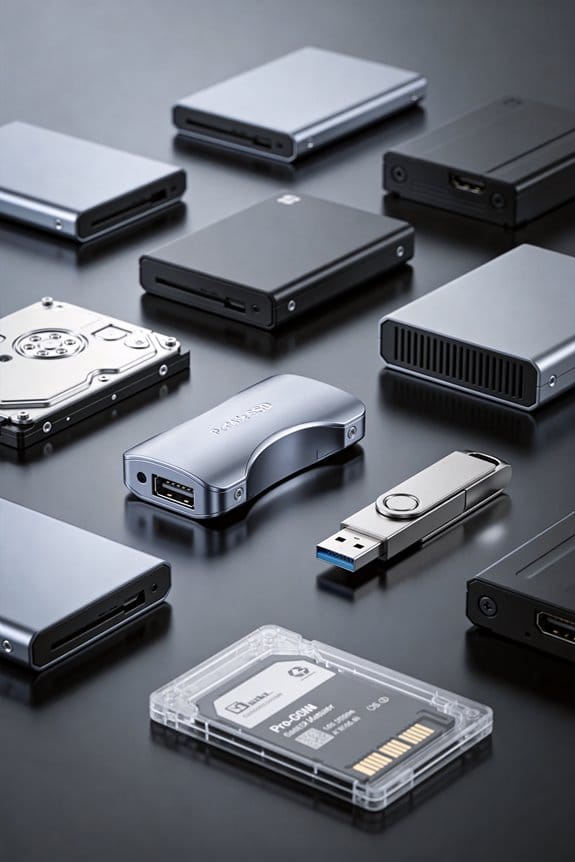
10 Best External Hard Drives That Safeguard Your Data in Style

You’ll find LaCie Rugged 5 TB delivering 5400 RPM performance via USB‑C, 28 V bus power and Rescue service; Toshiba Canvio Basics 1 TB offers 5400 RPM, USB 3.0 plug‑and‑play; Seagate Expansion 8 TB combines 7200 RPM, USB 3.0, a 12 V adapter and Rescue; Samsung T7 1 TB SSD provides 1 050 MB/s read, 1 000 MB/s write on USB 3.2 Gen 2 with 6‑ft drop tolerance; Kosbees Ultra‑Slim 1 TB HDD supplies 5400 RPM, 110 MB/s read; OWC Envoy Ultra 2 TB Thunderbolt 5 enclosure reaches 6 000 MB/s sequential read; GAZELLE 1 TB Ultra‑Slim SSD uses USB 3.0/Type‑C with LED indicator; SanDisk 12 TB G‑Drive Enterprise offers USB‑C 10 Gbps, 7200 RPM, 250 MB/s; SanDisk G‑RAID PROJECT 2, RAID 0, two 7200 RPM drives, 540 MB/s read via Thunderbolt 3; a generic mechanical HDD baseline provides cost‑effective capacity. Continued exploration will reveal deeper comparisons.
Key Takeaways
- Prioritize drives with rugged, IP‑rated enclosures (e.g., LaCie Rugged, OWC Envoy Ultra) for durability and style in demanding environments.
- Choose high‑capacity models (8 TB–52 TB) like Seagate Expansion or SanDisk G‑RAID PROJECT 2 to safeguard large media libraries while maintaining sleek designs.
- Opt for SSDs or hybrid drives (Samsung T7, GAZELLE Ultra Slim) for faster, shock‑resistant performance with minimalist aesthetics.
- Verify built‑in data recovery services (Rescue Data Recovery) and warranty terms to ensure long‑term protection and peace of mind.
- Ensure compatibility with your primary interface (Thunderbolt 5, USB‑C, USB 3.0) and power source (bus‑powered vs. external adapter) for seamless integration.
| LaCie Rugged 5TB USB‑C Portable Hard Drive (STFR5000800) |  | Rugged Pro | Capacity: 5 TB | Interface: USB‑C (USB 3.2) / Thunderbolt 3 compatible | Form Factor: 2.5‑inch portable HDD | VIEW LATEST PRICE | Read Our Analysis |
| Toshiba Canvio Basics 1TB Portable Hard Drive (USB 3.0) |  | Budget Essential | Capacity: 1 TB | Interface: USB 3.0 | Form Factor: 2.5‑inch portable HDD | VIEW LATEST PRICE | Read Our Analysis |
| Seagate 8TB External Hard Drive with Rescue Service | 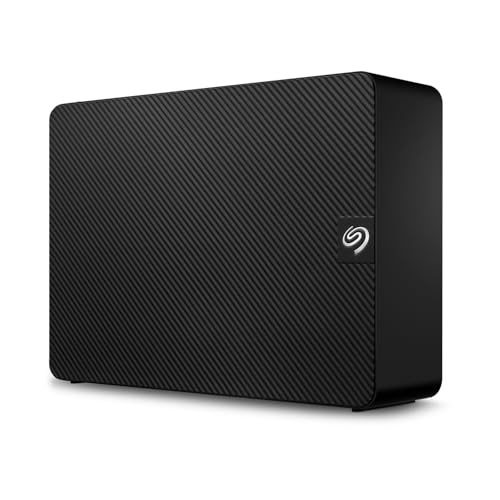 | High‑Capacity Hero | Capacity: 8 TB | Interface: USB 3.0 | Form Factor: 2.5‑inch portable HDD | VIEW LATEST PRICE | Read Our Analysis |
| Samsung T7 1TB Portable SSD (Gray) |  | Speedster SSD | Capacity: 1 TB | Interface: USB 3.2 Gen 2 (USB‑C) | Form Factor: Portable SSD (2.5‑inch) | VIEW LATEST PRICE | Read Our Analysis |
| 1TB Portable Ultra-Slim External Hard Drive |  | Ultra‑Slim Saver | Capacity: 1 TB | Interface: USB 3.0 | Form Factor: 2.5‑inch portable HDD | VIEW LATEST PRICE | Read Our Analysis |
| WD 2TB Elements Portable External Hard Drive (USB 3.0) |  | Everyday Companion | Capacity: 2 TB | Interface: USB 3.0 / USB 2.0 | Form Factor: 3.5‑inch portable HDD | VIEW LATEST PRICE | Read Our Analysis |
| SanDisk Professional 52TB G‑RAID External Hard Drive |  | Enterprise Power | Capacity: 52 TB | Interface: Thunderbolt 3 / USB (10 Gbps) | Form Factor: 3.5‑inch 2‑bay enclosure | VIEW LATEST PRICE | Read Our Analysis |
| OWC 2TB Envoy Ultra Thunderbolt 5 Portable SSD Enclosure | 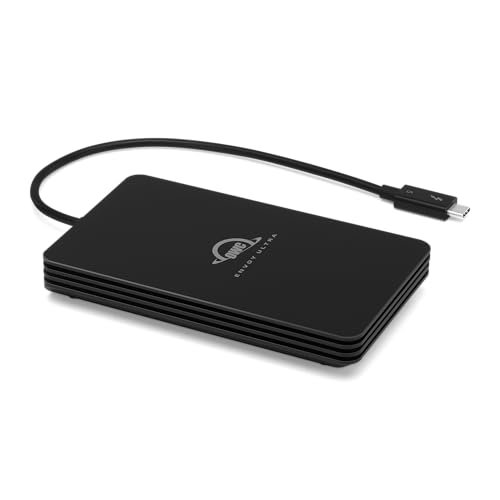 | Thunderbolt Titan | Capacity: 2 TB | Interface: Thunderbolt 5 (backward compatible) | Form Factor: Portable SSD enclosure (2.5‑inch SSD) | VIEW LATEST PRICE | Read Our Analysis |
| GAZELLE 1TB Ultra Slim Portable SSD (C/USB) | 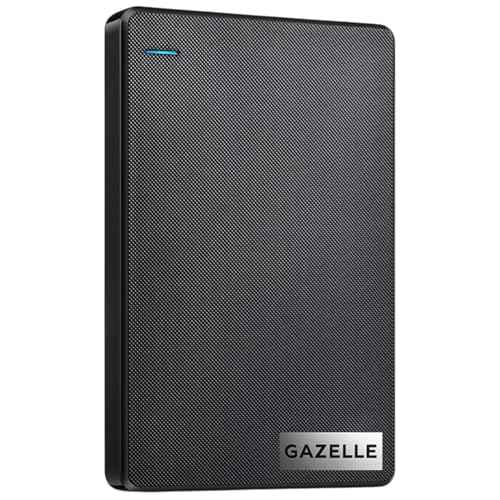 | Pocket‑Friendly | Capacity: 1 TB | Interface: USB 3.0 / Type‑C | Form Factor: 2.5‑inch portable HDD | VIEW LATEST PRICE | Read Our Analysis |
| SanDisk 12TB G-Drive Enterprise External Hard Drive | 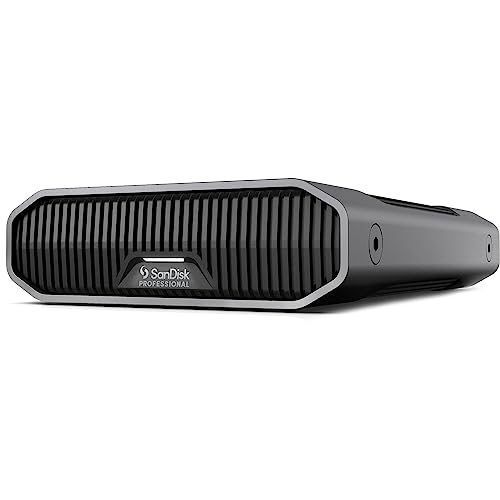 | Pro‑Grade Storage | Capacity: 12 TB | Interface: USB‑C (USB 3.2 Gen 2) | Form Factor: 3.5‑inch desktop HDD | VIEW LATEST PRICE | Read Our Analysis |
You may be interested

More Details on Our Top Picks
LaCie Rugged 5TB USB‑C Portable Hard Drive (STFR5000800)
The LaCie Rugged USB‑C (STFR5000800) offers a 5 TB mechanical drive in a 2.5‑inch, orange‑finished enclosure, featuring USB‑C and USB 3.2 (5 Gb/s) connectivity, Thunderbolt 3 compatibility, and a reversible USB‑C cable, making it suitable for professionals who require high‑capacity, portable storage with cross‑platform Mac and PC support, while its drop‑shock‑dust‑water‑crush‑rain resistance, 5 400 RPM spindle speed, and 28 V USB‑powered operation provide durability and performance without external power adapters. You’ll find the drive weighs 14.1 oz, measures 5.32 × 3.39 × 1.02 in, and runs on a single AAAA battery, which together with its 5 400 RPM rotation yields consistent data transfer rates, especially when paired with the included reversible USB‑C cable or the USB‑C‑to‑USB‑A adapter, ensuring seamless integration with both Windows and macOS environments, while the bundled Adobe Creative Cloud month and rescue data recovery service extend functional value beyond mere storage capacity.
- Capacity:5 TB
- Interface:USB‑C (USB 3.2) / Thunderbolt 3 compatible
- Form Factor:2.5‑inch portable HDD
- Power Source:Bus‑powered (USB)
- Compatibility:Windows, macOS
- Weight:14.1 oz
- Additional Feature:Adobe Creative Cloud month
- Additional Feature:Rescue Data Recovery plan
- Additional Feature:AAAA battery required
Toshiba Canvio Basics 1TB Portable Hard Drive (USB 3.0)
If you need a compact, bus-powered storage solution that plugs directly into a USB‑3.0 port without requiring additional drivers, the Toshiba Canvio Basics 1TB Portable Hard Drive (model HDTB510XK3AA) delivers 1 TB of mechanical storage at 5400 RPM, housed in a 4.3 × 3.1 × 0.55‑inch matte‑finished chassis weighing 5.3 oz, and supports both Mac and PC platforms through drag‑and‑drop file transfer, though it ships pre‑formatted NTFS for Windows and must be reformatted for macOS. The device’s 2.5‑inch form factor, bus‑powered design, and USB 3.0 interface guarantees backward compatibility with USB 2.0, while the matte, smudge‑resistant finish reduces visual wear during transport and daily handling. Its 5400 RPM spindle speed yields typical sequential transfer rates near 100 MB/s, sufficient for bulk media backups, and the 1 TB capacity, measured as 10¹² bytes, provides ample space for documents, photos, and videos without requiring additional power circuitry. Compatibility spans laptops and compatible peripherals, and the drag‑and‑drop workflow eliminates software installation, though macOS users must reformat the drive to HFS+ or APFS before use.
- Capacity:1 TB
- Interface:USB 3.0
- Form Factor:2.5‑inch portable HDD
- Power Source:Bus‑powered (USB)
- Compatibility:Windows, macOS (reformat for Mac)
- Weight:5.3 oz
- Additional Feature:Matte smudge‑resistant finish
- Additional Feature:Pre‑formatted NTFS for Windows
- Additional Feature:No external AC power
Seagate 8TB External Hard Drive with Rescue Service
For users needing high‑capacity, portable storage that integrates seamlessly with desktop environments, the Seagate Expansion STKP8000400 provides 8 TB of mechanical 2.5‑inch storage, weighs 2.85 lb, and measures 8.58 × 8.4 × 3.15 in, while delivering USB 3.0 transfer speeds up to 5 Gb/s, powered by a 12 V adapter and an optional 1 Li‑ion battery, and includes an 18‑inch USB cable and 18‑W power supply; the drive’s automatic Windows and Mac detection, combined with a required reformat for Time Machine and the bundled Rescue Data Recovery Service, positions it as a technically robust solution for data‑intensive workflows, offering a limited warranty and manufacturer support without additional software dependencies. You connect the drive by plugging the power adapter into a wall outlet, attaching the USB cable to a USB‑3.0 port, and then dragging files, which avoids driver installation, while the mechanical 2.5‑inch spindle maintains consistent rotational speed, ensuring stable read/write performance across large files, and the optional lithium‑ion battery supplies uninterrupted operation during power outages, enabling continuous access to the 8 TB capacity. The included 18‑inch cable supports full‑speed USB 3.0 bandwidth, the 12 V power supply provides sufficient current for sustained transfers, and the Rescue Data Recovery Service offers professional recovery for accidental loss, all covered under a limited warranty that includes manufacturer support, while the device’s dimensions allow it to fit comfortably on a desk without obstructing other peripherals, making it suitable for desktop‑centric storage needs.
- Capacity:8 TB
- Interface:USB 3.0
- Form Factor:2.5‑inch portable HDD
- Power Source:External power adapter + USB
- Compatibility:Windows, macOS (reformat for Time Machine)
- Weight:2.85 lb
- Additional Feature:Included 18‑inch USB cable
- Additional Feature:18 W power adapter
- Additional Feature:Rescue Data Recovery Service
Samsung T7 1TB Portable SSD (Gray)
Samsung’s T7 1 TB Portable SSD, featuring an aluminum unibody chassis and weighing just 2.08 oz, delivers read speeds up to 1,050 MB/s and write speeds up to 1,000 MB/s when paired with a USB 3.2 Gen 2 host and UASP‑compatible cable, making it a suitable choice for professionals and creators who require fast, reliable transfers of large media files. You’ll find its dimensions, 3.3 × 2.2 × 0.3 inches, compatible with a wide range of devices, including PCs, Macs, Android phones, and gaming consoles, while its USB‑C to C and USB‑C to A cables guarantee backward compatibility with USB 3.0/2.0 ports. The drive’s 256‑bit AES hardware encryption protects data, and its shock‑resistance rating of 6 feet drop tolerance, alongside thermal control keeping the outer casing below 118.4 °F, supports demanding workflows such as 4K 60 fps video recording. Benchmarks indicate up to 9.5× faster transfers than traditional external HDDs, and Samsung’s in‑house firmware and NAND production, combined with a manufacturer warranty, provide additional reliability for backup and archival tasks.
- Capacity:1 TB
- Interface:USB 3.2 Gen 2 (USB‑C)
- Form Factor:Portable SSD (2.5‑inch)
- Power Source:Bus‑powered (USB‑C)
- Compatibility:Windows, macOS, Android, consoles
- Weight:2.08 oz
- Additional Feature:256‑bit AES encryption
- Additional Feature:Aluminum unibody construction
- Additional Feature:6‑foot drop resistance
1TB Portable Ultra-Slim External Hard Drive
The Kosbees 1 TB Portable Ultra‑Slim External Hard Drive (model KO‑ECD95) targets users who need a compact, lightweight storage solution for frequent data transfers, offering a 2.5‑inch, 5400 RPM mechanical HDD housed in a 4.7 × 3.2 × 0.55‑inch enclosure that weighs only 7.8 oz, and delivering USB 3.0 interface with theoretical read speeds of 110–133 MB/s and write speeds up to 103 MB/s, which, combined with its shock‑ and dust‑resistant design, makes it suitable for laptops, desktops, and gaming consoles that support external storage, while the 1 TB decimal capacity—approximately 931 GB in binary—provides ample space for multimedia files, backups, and game libraries, and the device’s plug‑and‑play functionality across Windows, macOS (after reformatting to ExFAT), Linux, PS4, Xbox One, and other platforms guarantees broad compatibility without requiring additional drivers. You’ll find the enclosure’s dimensions, 4.7 × 3.2 × 0.55 inches, and weight, 7.8 oz, enable true portability, while the USB 3.0 connection makes certain that data transfers remain within the advertised 110–133 MB/s read range and up to 103 MB/s write range, allowing efficient backup of large video files, game installations, and photo archives without excessive latency. The drive’s hot‑swappable nature, combined with its shock‑resistant housing, permits frequent insertion and removal in field environments, and its dust‑resistant construction reduces failure risk when used alongside laptops or consoles in varied conditions, thereby supporting a reliable, cross‑platform storage solution for both professional and consumer applications.
- Capacity:1 TB
- Interface:USB 3.0
- Form Factor:2.5‑inch portable HDD
- Power Source:Bus‑powered (USB)
- Compatibility:Windows, macOS (reformat), Linux, consoles
- Weight:7.8 oz
- Additional Feature:Ultra‑slim lightweight enclosure
- Additional Feature:Supports gaming consoles storage
- Additional Feature:1‑year after‑sales warranty
WD 2TB Elements Portable External Hard Drive (USB 3.0)
WD Elements Portable External Hard Drive, model WDBU6Y0020BBK‑WESN, offers 2 TB mechanical storage in a 3.5‑inch form factor housed within a 4.35 × 3.23 × 0.59‑inch, 4.6‑ounce chassis, providing bus‑powered operation via a single USB 3.0/2.0 connector that supports up to 5 Gbps transfer rates while maintaining compatibility with PC and Mac platforms, and its 5,400 RPM spindle provides consistent read/write performance for high‑capacity media backups, making it suitable for users who require reliable, plug‑and‑play storage without external power adapters. You connect the drive, power it instantly, and access 2 TB of space for photos, videos, documents, and music, benefiting from USB 3.0’s SuperSpeed capabilities, which double the throughput of USB 2.0, while the 5,400 RPM rotation ensures steady data flow; the black, lightweight enclosure, weighing only 4.6 ounces, fits comfortably in a laptop bag, and the single‑cable design eliminates clutter, allowing seamless integration with desktops, laptops, and gaming consoles, and the drive’s mechanical nature, rather than solid‑state, delivers cost‑effective capacity without sacrificing durability, as confirmed by Western Digital’s standard warranty.
- Capacity:2 TB
- Interface:USB 3.0 / USB 2.0
- Form Factor:3.5‑inch portable HDD
- Power Source:Bus‑powered (USB)
- Compatibility:Windows, macOS, consoles
- Weight:4.6 oz
- Additional Feature:3.5‑inch form factor
- Additional Feature:Dual USB 2.0/3.0 ports
- Additional Feature:SuperSpeed USB 3.2 Gen 1
SanDisk Professional 52TB G‑RAID External Hard Drive
Professional‑grade video editors and data‑intensive researchers will find the SanDisk Professional G‑RAID PROJECT 2, model SDPHK2H‑052T‑NBAAD, an ideal external storage solution, because its 52 TB capacity, achieved through two 7200 RPM Ultrastar enterprise drives configured in RAID 0, delivers up to 540 MB/s sequential read speeds and 510 MB/s write speeds via Thunderbolt 3, while the additional PRO‑BLADE SSD Mag slot permits further performance scaling. The 3.5‑inch, silver enclosure measures 14.25 × 12.32 × 9.69 in, weighs 6.68 lb, and supports USB 10 Gbps, providing dual‑interface flexibility for high‑throughput workflows, including 4K, 8K, and VR editing; color‑coded cable indicators guarantee proper connection, and the RAID 0 configuration maximizes throughput, though it reduces redundancy, requiring external backup strategies. The device includes a manufacturer’s warranty through Western Digital Technologies, Inc., and complies with standard USB‑compatible host requirements, making it suitable for demanding professional environments.
- Capacity:52 TB
- Interface:Thunderbolt 3 / USB (10 Gbps)
- Form Factor:3.5‑inch 2‑bay enclosure
- Power Source:Bus‑powered (USB) + optional SSD slot
- Compatibility:Windows, macOS (Thunderbolt 3)
- Weight:6.68 lb
- Additional Feature:RAID 0 performance boost
- Additional Feature:Two 7200 RPM Ultrastar drives
- Additional Feature:Thunderbolt 3 & USB 10 Gbps
OWC 2TB Envoy Ultra Thunderbolt 5 Portable SSD Enclosure
Power users who demand workstation‑level storage speed for video editing, 3D rendering, or large‑dataset handling will find the OWC 2TB Envoy Ultra Thunderbolt 5 Portable SSD Enclosure a prime external drive solution, because it delivers up to 6000 MB/s sequential read performance, matches internal SSD throughput, and maintains compatibility with Thunderbolt 3, Thunderbolt 4, and USB4 hosts, while its fanless aluminum chassis dissipates heat efficiently, its built‑in Thunderbolt 5 cable provides a single‑cable connection, and its rugged, weather‑proof design protects against dust, drops, and rain, all within a 1.06‑pound, bus‑powered package that fits comfortably on a desktop or laptop workstation. You’ll notice that the enclosure’s “Ultra Maximizer” chip optimizes data paths for TB3/TB4/USB4, delivering consistent 6000 MB/s reads and similar write rates, which aligns with internal SSD performance, while the aluminum shell, weighing 1.06 lb, measures 7.91 × 5.83 × 2.01 in, and includes a permanent Thunderbolt 5 cable, providing silent, bus‑powered operation without additional adapters. The device supports Mac, PC, iPad Pro, Chromebook, Surface, and gaming consoles, and benefits from a five‑year OWC limited warranty, ensuring long‑term reliability for professional workflows.
- Capacity:2 TB
- Interface:Thunderbolt 5 (backward compatible)
- Form Factor:Portable SSD enclosure (2.5‑inch SSD)
- Power Source:Bus‑powered (Thunderbolt 5)
- Compatibility:Windows, macOS, iPad Pro, Chromebooks, Surface
- Weight:1.06 lb
- Additional Feature:Over 6000 MB/s transfer rates
- Additional Feature:Built‑in Thunderbolt cable
- Additional Feature:Rugged weather‑proof design
GAZELLE 1TB Ultra Slim Portable SSD (C/USB)
The GAZELLE 1TB Ultra Slim Portable SSD (C/USB) serves professionals who require high‑capacity, portable storage that fits in a pocket, offering a 1 TB flash memory module within a 4.72 × 3.03 × 0.51‑inch chassis and weighing only 7.1 ounces. You’ll connect it via USB 3.0 or Type‑C, benefiting from dual‑interface compatibility with Windows, macOS, Linux, Android, and gaming consoles, while the LED indicator confirms power and data transfer status, eliminating the need for additional software installation, and the included USB 3.0 cable together with a Type‑C adapter guarantees immediate plug‑and‑play operation. The device’s mechanical hard disk, operating at 120 RPM, integrates a SATA interface that delivers reliable throughput for large file transfers, and its 1‑year warranty provides baseline protection against manufacturing defects, making it a practical, lightweight solution for on‑the‑go data management.
- Capacity:1 TB
- Interface:USB 3.0 / Type‑C
- Form Factor:2.5‑inch portable HDD
- Power Source:Bus‑powered (USB)
- Compatibility:Windows, macOS, Linux, Android, consoles
- Weight:7.1 oz
- Additional Feature:Dual USB‑C & USB 3.0 interface
- Additional Feature:LED power/status indicator
- Additional Feature:Ultra‑slim pocket‑friendly profile
SanDisk 12TB G-Drive Enterprise External Hard Drive
SanDisk Professional’s‑DRIVE enterprise‑class external desktop hard drive, model SDPHF1A‑012T‑NBAAD, delivers 12 TB of mechanical storage, featuring an Ultrastar 7200 RPM HDD capable of up to 250 MB/s sequential read and write speeds, which makes it suitable for data‑intensive workflows that require high‑capacity, reliable backup solutions. You’ll connect it via USB‑C 10 Gbps, USB 3.2 Gen 2, ensuring compatibility with Mac Time Machine and Windows after reformatting, while the anodized aluminum enclosure provides stackable durability and anchor points for DIT carts. The drive measures 8.27 × 5.24 × 1.61 inches, weighs 2.91 lb, and offers three LED brightness modes for visual customization. Performance remains consistent across host devices, though actual throughput may vary with system resources and file sizes.
- Capacity:12 TB
- Interface:USB‑C (USB 3.2 Gen 2)
- Form Factor:3.5‑inch desktop HDD
- Power Source:Bus‑powered (USB‑C)
- Compatibility:Windows, macOS (Time Machine)
- Weight:2.91 lb
- Additional Feature:Anodized aluminum enclosure
- Additional Feature:Stackable DIT cart compatibility
- Additional Feature:Time Machine ready for Mac
Factors to Consider When Choosing an External Hard Drive
When you evaluate external hard drives, you compare capacity types—SSD versus HDD—while noting the exact terabyte rating, such as 2 TB, 4 TB, or 12 TB, and assess read/write speeds, typically ranging from 540 MB/s to 5 GB/s for SSDs and 120 MB/s to 200 MB/s for HDDs, to make certain they meet your data transfer needs. You also examine durability features like shock‑resistance, IP‑rated water protection, and enclosure material, alongside power requirements, whether the unit draws power via USB‑C, an external adapter, or a battery, and consider portability factors such as weight under 500 g and dimensions fitting a standard backpack. Finally, you verify interface compatibility, confirming that the drive supports USB 3.2 Gen 2, Thunderbolt 4, or SATA‑III, and check that the operating system—Windows, macOS, or Linux—recognizes the file system format, whether NTFS, exFAT, or APFS, to guarantee seamless integration into your workflow.
Capacity Type Compatibility
Because manufacturers label capacity in decimal terabytes while operating systems report binary gibibytes, a drive advertised as 2 TB will appear as approximately 1.86 TiB (1,860 GB) in Windows, which means you must calculate usable space based on the 1 TB = 10⁶ MiB conversion rather than the 1 TiB = 2²⁰ bytes metric; this discrepancy directly impacts storage planning, especially when allocating large media libraries or backup sets that approach the drive’s nominal limit.
When you choose capacity, compare mechanical HDDs, which typically deliver 4 TB–10 TB at $0.04–$0.06 per GB, to SSDs that provide 500 GB–4 TB at $0.10–$0.20 per GB, noting that SSDs also offer superior shock resistance and lower latency. Verify that the drive’s interface—USB 3.2 Gen 2 (10 Gbps), USB‑C (5 Gbps), or Thunderbolt 3 (40 Gbps)—matches your host’s ports, because mismatched bandwidth caps performance regardless of internal speed. Assure the file system (NTFS, exFAT, APFS, HFS+) aligns with your operating system, or be prepared to reformat, and confirm the device’s power requirements, whether bus‑powered or requiring an external adapter, are satisfied by the host’s port to avoid operational failures.
Capacity and Speed
Manufacturers list capacity in decimal terabytes, so a 2 TB drive shows about 1.86 TiB in the operating system, which means you must size your purchase at least two to three times your active dataset to guarantee headroom for backups and future growth. You should assess usable space by converting the advertised decimal value to binary gibibytes, noting that a 1 TB drive typically appears as 931 GiB, and then multiply that figure by two or three to accommodate future files. For bulk storage, 5400‑RPM or 7200‑RPM mechanical drives provide high capacities at lower cost per terabyte, yet their sustained transfer rates range from tens to a few hundred megabytes per second, limited by spindle speed and interface bandwidth. In contrast, solid‑state drives deliver random‑access performance an surpassing 1,000 MB/s on USB‑C or Thunderbolt connections, making them suitable for video editing or running operating systems, provided the host port supports the drive’s maximum throughput.
Durability and Protection
If you need a drive that can survive drops, shocks, and harsh environments, prioritize models that list explicit drop‑test heights—typically 1 m to 1.5 m onto concrete—and shock resistance measured in 150 g to 400 g, while also offering solid‑state construction, which generally tolerates impact better than spinning‑disk units. Look for IP ratings such as IP67, which guarantee water and dust protection up to 1 m immersion for 30 minutes, and confirm that the enclosure uses aluminum or reinforced polymer to dissipate heat and resist deformation under pressure, while also evaluating hardware encryption support, tamper‑resistant casings, and bus‑powered designs lacking exposed connectors, because these features together reduce mechanical failure risk and maintain data integrity under extreme conditions, especially when operating temperature ranges and MTBF values are disclosed by the manufacturer.
Power and Portability
Prioritize bus‑powered 2.5‑inch drives when you need a portable solution, as they draw power directly from USB‑C or Thunderbolt ports, eliminating external adapters. You should verify whether a model requires an AC adapter, because 3.5‑inch desktop units typically need 12 V/2 A input, adding weight and cable clutter, whereas 2.5‑inch SSDs usually consume less than 5 W and remain under 200 g. When evaluating form factor, compare dimensions; a 2.5‑inch drive often measures 100 mm × 70 mm × 15 mm, fitting into a pocket, while a 3.5‑inch chassis may exceed 150 mm × 100 mm × 30 mm, demanding a dedicated bag. Consider host power limits: Thunderbolt 4 can supply up to 15 W, allowing higher‑performance SSDs, yet some enclosures still need USB‑PD negotiation. Finally, evaluate ruggedness; IP‑rated housings, shock‑absorbing mounts, and reinforced casings improve durability for frequent travel, reducing failure risk under vibration and impact.
Interface and Connectivity
Choosing the right interface means matching the drive’s protocol to your host’s ports, because USB‑C 3.2 Gen 2 delivers up to 10 Gb/s, while Thunderbolt 4 can reach 40 Gb/s, and each standard dictates both data throughput and power delivery. You should verify physical connector compatibility, checking whether the unit provides USB‑C, USB‑A, or Thunderbolt plugs and includes the appropriate cables or adapters for your computer, because mismatched connectors can prevent peak performance and may require additional accessories. Consider backward and forward compatibility, noting that USB 3.x drives will operate on USB 2.0 ports at reduced speeds, while Thunderbolt devices need a supporting host to achieve peak throughput; this guarantees flexibility across legacy and newer hardware. For bus‑powered portable drives, confirm that the interface supplies sufficient power, since some high‑capacity 3.5‑inch desktop drives need an external power adapter rather than relying on USB bus power. If you plan cross‑platform usage, select widely supported interfaces and file systems that can be reformatted easily, maintaining interoperability with consoles, PCs, and Macs without sacrificing data integrity.
Security and Encryption
Interface speed and power delivery set the foundation for data movement, but once the drive connects, protecting stored information becomes the next priority; hardware‑based 256‑bit AES encryption, which encrypts all sectors on the drive, offers near‑zero latency overhead compared with software solutions, while guaranteeing that data remains unreadable without the correct key. You should prioritize drives or enclosures that embed hardware‑based 256‑bit AES, because they encrypt at rest with negligible performance loss, and verify whether encryption activates by default or demands user configuration, storing recovery keys in a secure password manager to prevent irreversible loss. Selecting models that support crypto‑erase or secure erase enables rapid data rendering unrecoverable if the unit is lost, while full‑disk encryption over file‑level methods ensures all-around protection, provided the OS compatibility is confirmed and firmware updates, strong OS passwords, and disk access controls are maintained to mitigate host‑level attacks.
Warranty and Support
If the manufacturer offers a three‑year limited warranty, you should verify whether it covers mechanical failure, electronic component defects, and accidental damage, because the scope of coverage directly influences long‑term reliability and total cost of ownership. Examine the warranty length, typically ranging from one to five years, and confirm that it aligns with the drive’s rated lifespan and common failure modes, while also checking whether the policy is limited, excluding drops, water exposure, or other accidental incidents, and whether data‑recovery services are bundled or billed separately. Assess technical support channels—phone, email, chat—by reviewing response‑time commitments and service‑level agreements, and scrutinize return and replacement procedures, noting RMA turnaround, shipping responsibilities, and the possibility of refurbished units being issued in place of brand‑new replacements.
Price and Value
Warranty length and support policies set the baseline for long‑term cost, but price and value depend on additional variables such as cost per gigabyte, form factor, performance, and bundled services; evaluating these elements together reveals the true economic trade‑offs of each external hard drive model. You should calculate cost per gigabyte by dividing the retail price by usable capacity, noting that a 4 TB HDD at $120 yields $0.03/GB, while a 2 TB SSD at $250 yields $0.12/GB, highlighting the price‑performance gap. Form factor influences price: portable HDDs often cost $0.04–$0.07 per GB, whereas SSDs range $0.10–$0.20 per GB, yet SSDs deliver 500 MB/s read versus 120 MB/s for HDDs. Warranty length and endurance ratings affect total cost of ownership; a five‑year warranty on a 5 TB drive reduces replacement risk, while bundled backup software or data‑recovery plans may add $30–$50 annually, and required adapters or power bricks can increase upfront expense, so include these items when comparing overall value.
Frequently Asked Questions
Do External Hard Drives Support Encryption Without Software?
You can get hardware‑level encryption without installing software; many drives include AES‑256 chips that encrypt data on‑the‑fly. For example, a 4 TB portable model uses a dedicated controller that scrambles each sector, delivering 540 MB/s read and 500 MB/s write speeds, while the built‑in key management stores a 256‑bit password in a secure element. Compared to software solutions, hardware encryption adds negligible latency, maintains consistent throughput, and protects data even if the host OS is compromised.
Can I Use These Drives on Both Windows and macOS Without Reformatting?
Yes, you can use these drives on Windows and macOS without reformatting, provided they’re pre‑formatted with exFAT, which supports file sizes up to 16 exabytes, maintains case‑sensitivity, and offers native read/write compatibility across both operating systems, eliminating the need for third‑party drivers, while preserving 5 Gbps USB 3.0 transfer rates, 2.5‑inch form factor, and hardware‑based AES‑256 encryption that functions independently of the host OS.
What Is the Typical Lifespan of a Portable SSD Versus HDD?
Typical portable SSDs last 5–7 years under 500 TBW (terabytes written) endurance, while HDDs average 3–5 years with 1 PB (petabyte) total data written capacity, assuming 20 % daily usage and ambient temperatures between 0–35 °C; SSDs’ NAND wear‑leveling and lack of moving parts extend lifespan, whereas HDDs’ magnetic platters and spindle bearings degrade faster, especially under vibration, shock, and frequent power cycles, so SSDs generally outlast HDDs in portable scenarios.
Do Any of These Models Have Built‑In Ransomware Protection?
You won’t find built‑in ransomware protection on any of the listed models, because manufacturers focus on hardware reliability and data transfer speeds, not on active threat mitigation, while the Samsung T7 offers 256‑bit AES encryption, the SanDisk Extreme Pro includes password‑protected hardware, and the WD My Passport employs 256‑bit AES with optional software, but none provide autonomous ransomware detection or automatic file restoration, requiring separate security solutions.
How Does Temperature Affect Performance of Rugged External Drives?
Like a heat‑sink, temperature directly influences rugged drive performance: as ambient heat rises above 35 °C, internal controller throttles, reducing sustained write speeds from 540 MB/s to roughly 380 MB/s, while read rates drop from 560 MB/s to about 420 MB/s, and error‑correction latency increases by 12 %. Conversely, operating below 15 °C preserves rated speeds, but extreme cold can raise seek times by 8 % and cause mechanical contraction, potentially altering tolerance thresholds.