As an Amazon Associate, we earn from qualifying purchases. Some links on this site are affiliate links at no extra cost to you. Our recommendations are based on thorough research and editorial judgment.

10 Best Micro SD Card Readers That Actually Work Every Time

You’ll want micro SD card readers offering USB 3.0 or USB 3.2 connectivity delivering 5 Gbps transfer speeds, dual-slot simultaneous read/write capability, and broad platform compatibility spanning Windows, macOS, Linux, Android, and iOS. Models like Wansurs CR034, Anker, SmartQ C356, and Kingston MLPM support high-capacity cards up to 2TB, achieve sustained speeds of 80–300+ MB/s depending on UHS standards, and eliminate driver installation requirements through plug-and-play operation. Each model’s specific connector type, slot configuration, and performance metrics determine ideal device compatibility and workflow efficiency.
Key Takeaways
- USB 3.0/3.2 interfaces with 5+ Gbps speeds ensure reliable, fast transfers across compatible devices without bottlenecking.
- Dual-slot simultaneous read/write capability eliminates card-swapping delays and enables efficient multi-card workflows on compatible readers.
- Broad platform compatibility (Windows, macOS, Linux, Android, iOS) with plug-and-play operation requires no driver installation.
- Support for SD, SDHC, SDXC, microSD, microSDHC, and microSDXC formats up to 2TB ensures universal card compatibility.
- Durable construction (aluminum alloy, zinc alloy cases) with protective end covers and reversible connectors enhance long-term reliability.
| Wansurs USB 3.0 Micro SD Card Reader Adapter |  | Best Overall | Primary Connector Type: USB 3.0 Type-A | Supported Card Slots: Dual slots (SD + microSD, not simultaneous) | Maximum Transfer Speed: 5 Gbps (USB 3.0) | VIEW LATEST PRICE | Read Our Analysis |
| SD Card Reader USB-C Dual Slots Memory Card Adapter |  | Most Versatile | Primary Connector Type: USB Type-C and USB Type-A | Supported Card Slots: Dual slots (SD + microSD, simultaneous) | Maximum Transfer Speed: Not specified (high-speed capable) | VIEW LATEST PRICE | Read Our Analysis |
| Anker USB 3.0 Micro SD Card Reader Adapter |  | Editor’s Choice | Primary Connector Type: USB 3.0 Type-A | Supported Card Slots: Dual slots (SD + microSD, simultaneous) | Maximum Transfer Speed: 5 Gbps (USB 3.0) | VIEW LATEST PRICE | Read Our Analysis |
| C356 Type-C MicroSD Card Reader USB 3.0 | 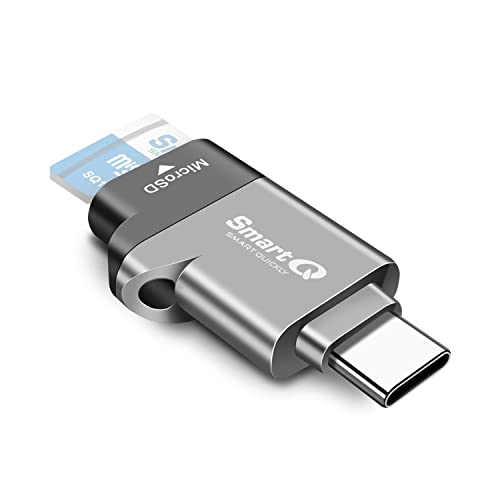 | Best For Travel | Primary Connector Type: USB Type-C and USB Type-A | Supported Card Slots: Single slot (microSD only) | Maximum Transfer Speed: 5 Gbps (USB 3.0) | VIEW LATEST PRICE | Read Our Analysis |
| SD Card Reader for iPhone & iPad (No App) | 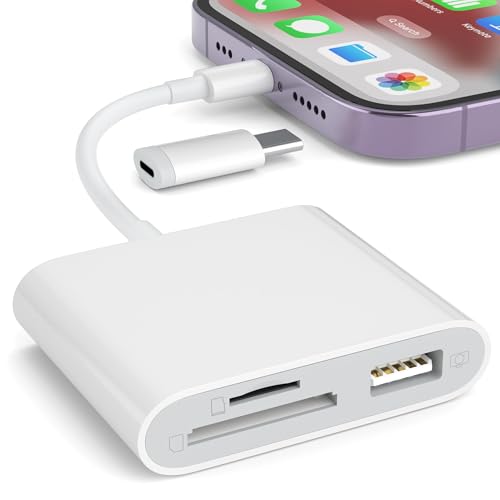 | Best For Apple Users | Primary Connector Type: Lightning and USB Type-C | Supported Card Slots: Dual slots (SD + microSD) | Maximum Transfer Speed: Not specified (plug-and-play) | VIEW LATEST PRICE | Read Our Analysis |
| Wansurs Micro SD Card Reader USB Adapter (3-Pack) |  | Budget-Friendly Pick | Primary Connector Type: USB Type-A | Supported Card Slots: Single slot (microSD only) | Maximum Transfer Speed: 480 Mbps (USB 2.0) | VIEW LATEST PRICE | Read Our Analysis |
| Mepsies USB-C SD Card Reader with OTG Adapter |  | Compact & Portable | Primary Connector Type: USB Type-C | Supported Card Slots: Single slot (microSD only) | Maximum Transfer Speed: 5 Gbps (USB 3.0) | VIEW LATEST PRICE | Read Our Analysis |
| uni USB-C SD Card Reader Dual Slots |  | Professional Grade | Primary Connector Type: USB Type-C and USB Type-A | Supported Card Slots: Dual slots (SD + microSD, simultaneous) | Maximum Transfer Speed: 5 Gbps (USB 3.0) | VIEW LATEST PRICE | Read Our Analysis |
| Kingston MobileLite Plus USB 3.2 microSDHC/SDXC UHS-II Card Reader (MLPM) | 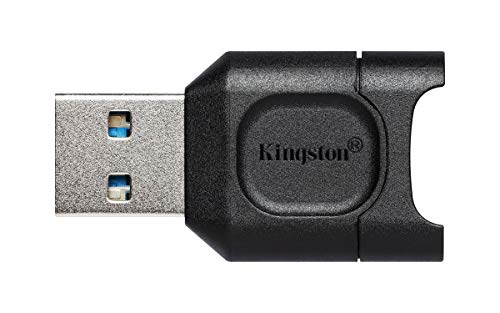 | Fastest Performance | Primary Connector Type: USB 3.2 Gen 1 Type-A | Supported Card Slots: Single slot (microSD only) | Maximum Transfer Speed: 10× faster than USB 2.0 (USB 3.2 Gen 1) | VIEW LATEST PRICE | Read Our Analysis |
| PGYTECH CreateMate Mini SD Card Reader with Storage | 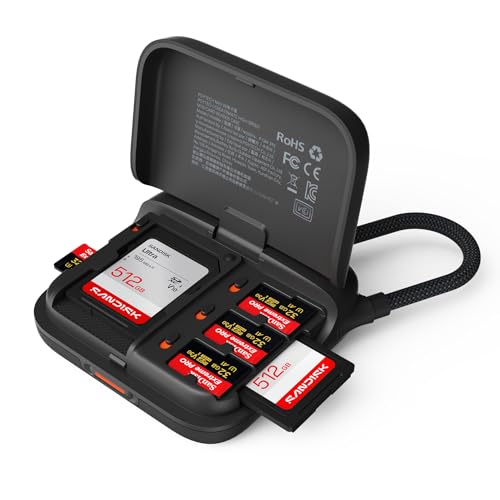 | Best Storage Solution | Primary Connector Type: USB Type-C | Supported Card Slots: Multiple slots (2 SD + 4 microSD) | Maximum Transfer Speed: 312 MB/s (USB 3.1) | VIEW LATEST PRICE | Read Our Analysis |
You may be interested
More Details on Our Top Picks
Wansurs USB 3.0 Micro SD Card Reader Adapter
The Wansurs USB 3.0 Micro SD Card Reader Adapter (Model CR034) delivers peak performance for photographers, content creators, and professionals who require rapid file transfer capabilities between memory cards and computing devices. This compact adapter features dual card slots—one SD and one microSD—supporting SD, SDHC, SDXC, microSD, microSDHC, and microSDXC formats, though you cannot use both simultaneously. The USB 3.0 connection enables transfer speeds up to 5 Gbps, facilitating efficient data movement across Windows, macOS, Linux, Android, and iOS platforms. Measuring 2.36 by 0.47 by 0.28 inches and weighing 0.353 ounces, the adapter operates plug-and-play without requiring driver installation. Wansurs provides extensive support through a two-year warranty and twenty-four-hour customer assistance.
- Primary Connector Type:USB 3.0 Type-A
- Supported Card Slots:Dual slots (SD + microSD, not simultaneous)
- Maximum Transfer Speed:5 Gbps (USB 3.0)
- Installation Requirements:No drivers required
- Compact/Portable Design:Compact (2.36 x 0.47 x 0.28 inches)
- Warranty/Support:2-year warranty with 24/7 support
- Additional Feature:Dual SD/Micro SD slots
- Additional Feature:No simultaneous dual-slot support
- Additional Feature:2-year warranty included
SD Card Reader USB-C Dual Slots Memory Card Adapter
For photographers, videographers, and content creators who frequently transfer files between multiple memory cards, the REPIND USB-C dual-slot SD card reader offers a distinctive advantage through its 2-in-1 integrated design supporting simultaneous access to both SD and microSD cards. The device supports up to 2TB card capacity per SDXC specifications, accommodating SD, SDHC, SDXC, microSD, microSDHC, and microSDXC formats. Its plug-and-play functionality requires no driver installation or external power, while dual USB connectors enable direct compatibility with USB-C and USB-A ports across Windows, macOS, Linux, and Chrome OS platforms. The compact form factor, weighing 0.317 ounces, provides portability for on-the-go professionals requiring reliable file backup and editing workflows.
- Primary Connector Type:USB Type-C and USB Type-A
- Supported Card Slots:Dual slots (SD + microSD, simultaneous)
- Maximum Transfer Speed:Not specified (high-speed capable)
- Installation Requirements:No driver installation
- Compact/Portable Design:Slim, compact form factor
- Warranty/Support:Seller/retailer return policy
- Additional Feature:Simultaneous dual-card access
- Additional Feature:Supports up to 2TB
- Additional Feature:Protective dust/liquid covers
Anker USB 3.0 Micro SD Card Reader Adapter
Anker’s USB 3.0 Micro SD Card Reader (Model 68ANREADER-B2A) stands as an ideal solution for users who require reliable, multi-format card compatibility across laptops, desktops, tablets, and smartphones. The device supports SDXC, SDHC, MMC, RS-MMC, Micro SDXC, Micro SD, and Micro SDHC formats, delivering data transfer rates up to 5 Gbps through USB 3.0 connectivity with backward compatibility to USB 2.0 and 1.1. Its dual-slot design enables simultaneous read/write operations on two cards. Bus-powered operation requires no external power, while the compact dimensions of 2.09 x 1.06 x 0.43 inches and 13.61-gram weight facilitate portability. Compatible with Windows 10, 8, 7, Vista, and Mac OS X 10.2 and above, installation requires no driver configuration.
- Primary Connector Type:USB 3.0 Type-A
- Supported Card Slots:Dual slots (SD + microSD, simultaneous)
- Maximum Transfer Speed:5 Gbps (USB 3.0)
- Installation Requirements:No drivers required
- Compact/Portable Design:Compact (2.09 x 1.06 x 0.43 inches)
- Warranty/Support:18-month warranty
- Additional Feature:Simultaneous read/write capability
- Additional Feature:USB 2.0 backward compatible
- Additional Feature:18-month warranty included
C356 Type-C MicroSD Card Reader USB 3.0
SmartQ’s C356 Type-C MicroSD Card Reader stands as an ideal solution for content creators and mobile-device users requiring rapid data transfer between smartphones, tablets, and computers. This compact reader supports microSD, microSDHC, and microSDXC cards, delivering transfer speeds up to 5 Gbps via USB 3.0 SuperSpeed connectivity. Compatible with Android devices, iPads, MacBooks, and Windows PCs, it requires no additional drivers for plug-and-play operation. The lightweight design, weighing 0.35 ounces with dimensions of 1.35 x 0.87 x 0.3 inches, facilitates portability across professional and personal environments, handling high-capacity cards and large files efficiently for photography, video, and storage expansion applications.
- Primary Connector Type:USB Type-C and USB Type-A
- Supported Card Slots:Single slot (microSD only)
- Maximum Transfer Speed:5 Gbps (USB 3.0)
- Installation Requirements:No additional drivers required
- Compact/Portable Design:Compact, lightweight (1.35 x 0.87 x 0.3 inches)
- Warranty/Support:Manufacturer warranty available
- Additional Feature:Built-in blue LED indicator
- Additional Feature:High-capacity card support
- Additional Feature:Interference resistance design
SD Card Reader for iPhone & iPad (No App)
The SZHAIYIJIN SD Card Reader (Model OL+) stands out for photographers and content creators who need to transfer images and videos from Canon or Nikon cameras directly to their iPhones or iPads without installing additional applications. This white, compact device weighs 1.44 ounces and features dual card slots accommodating both standard SD and microSD/TF cards. The plug-and-play reader imports photos and videos within five seconds of insertion, supporting two-way transfers through the native Photos app. Its detachable USB-C to Lightning adapter enables compatibility across iOS 13–18 devices, while the female USB interface accepts compatible peripherals with current limits not exceeding 500 milliamperes, providing versatile cross-platform functionality for photographers requiring efficient field-to-device workflows.
- Primary Connector Type:Lightning and USB Type-C
- Supported Card Slots:Dual slots (SD + microSD)
- Maximum Transfer Speed:Not specified (plug-and-play)
- Installation Requirements:No app required
- Compact/Portable Design:Large form factor (5.98 x 2.36 x 0.54 inches)
- Warranty/Support:Seller/platform return policy
- Additional Feature:Lightning/USB-C dual connectors
- Additional Feature:Two-way import/export transfers
- Additional Feature:OTG cross-platform support
Wansurs Micro SD Card Reader USB Adapter (3-Pack)
For users who need portable, reliable card reading across multiple devices, Wansurs’ 3-pack micro SD card reader offers a compact solution with aluminum alloy construction, USB 2.0 compatibility supporting data transfer rates up to 480 Mbps, and a hidden-slot design that reduces card damage risk. Each reader weighs 0.634 ounces, measuring 0.9 x 0.67 x 0.3 inches, enabling keychain attachment via lanyard hole. The updated chip architecture minimizes heat generation, ensuring stable data transmission across computers, televisions, car systems, and USB-enabled devices. Operating system compatibility spans mainstream platforms utilizing standard USB ports, with backward compatibility supporting USB 3.0 connections for enhanced flexibility across diverse computing environments.
- Primary Connector Type:USB Type-A
- Supported Card Slots:Single slot (microSD only)
- Maximum Transfer Speed:480 Mbps (USB 2.0)
- Installation Requirements:No driver required
- Compact/Portable Design:Ultra-small (0.9 x 0.67 x 0.3 inches, hidden slot)
- Warranty/Support:Seller/manufacturer policies
- Additional Feature:Hidden microSD/TF slot design
- Additional Feature:Keychain lanyard hole
- Additional Feature:Aluminum alloy shell
Mepsies USB-C SD Card Reader with OTG Adapter
Mepsies’ XS USB C TF Card Reader excels for users with USB-C equipped devices—including MacBooks, Samsung Galaxy smartphones, and Google Pixel tablets—who need portable microSD card access without driver installation. The zinc alloy metal case, weighing 0.16 ounces with dimensions of 0.9 x 0.63 x 0.39 inches, provides durability and portability. Supporting microSD, microSDHC, and microSDXC formats, this plug-and-play reader enables read/write functionality for photos, videos, and files across Mac OS, Windows, Linux, and Android platforms. The included USB-C to USB adapter extends compatibility to desktop computers, while the integrated blue LED indicator confirms operational status during data transfers.
- Primary Connector Type:USB Type-C
- Supported Card Slots:Single slot (microSD only)
- Maximum Transfer Speed:5 Gbps (USB 3.0)
- Installation Requirements:No driver installation required
- Compact/Portable Design:Mini size, keychain portable (0.9 x 0.63 x 0.39 inches)
- Warranty/Support:Seller/manufacturer warranty
- Additional Feature:Zinc alloy metal case
- Additional Feature:Included USB-C adapter
- Additional Feature:Built-in blue LED
uni USB-C SD Card Reader Dual Slots
If you’re working with multiple memory cards simultaneously—whether you’re downloading photos from a camera while transferring files from a drone—this reader stands out as an ideal choice. uni’s UNICASD01 model combines USB Type-C connectivity with dual SD/microSD card slots, enabling concurrent read/write operations at speeds up to 5 Gbps through USB 3.0 compatibility. The device supports MMC, RS-MMC, SD, SDHC, SDXC, microSD, microSDHC, and microSDXC formats across Mac, PC, and Android platforms. Its compact design, measuring 3.94 by 2.36 by 0.67 inches and weighing 0.459 ounces, includes protective dust- and liquid-resistant end covers, eliminating the need for external power supplies or driver installations on supported operating systems.
- Primary Connector Type:USB Type-C and USB Type-A
- Supported Card Slots:Dual slots (SD + microSD, simultaneous)
- Maximum Transfer Speed:5 Gbps (USB 3.0)
- Installation Requirements:No additional software required
- Compact/Portable Design:Slim profile, lightweight (0.67 x 2.36 x 3.94 inches)
- Warranty/Support:18-month warranty with 24/7 service
- Additional Feature:Dust/liquid-resistant end covers
- Additional Feature:Attached cord for convenience
- Additional Feature:24/7 customer service
Kingston MobileLite Plus USB 3.2 microSDHC/SDXC UHS-II Card Reader (MLPM)
The Kingston MobileLite Plus (MLPM) delivers USB 3.2 Gen 1 connectivity, enabling transfer speeds approximately ten times faster than USB 2.0 standards, which makes it particularly valuable for content creators and professionals who regularly process large image and video files. This compact reader supports microSD, microSDHC, microSDXC, and SDXC cards through UHS-II architecture, maintaining backward compatibility with UHS-I cards. The device operates across Windows, macOS, Linux, and Chrome OS platforms. Measuring 1.44 × 0.79 × 0.29 inches and weighing 0.317 ounces, the MLPM provides portable performance optimization for mobile workflows and travel-based operations.
- Primary Connector Type:USB 3.2 Gen 1 Type-A
- Supported Card Slots:Single slot (microSD only)
- Maximum Transfer Speed:10× faster than USB 2.0 (USB 3.2 Gen 1)
- Installation Requirements:No driver required
- Compact/Portable Design:Compact, travel-friendly (1.44 × 0.79 × 0.29 inches)
- Warranty/Support:Manufacturer warranty
- Additional Feature:UHS-II peak performance support
- Additional Feature:10× faster than USB 2.0
- Additional Feature:Canvas optimized performance
PGYTECH CreateMate Mini SD Card Reader with Storage
Content creators and professionals managing multiple memory cards will find PGYTECH’s CreateMate Mini an efficient solution, as it consolidates card reading, storage, and portability into one compact device. The 2-in-1 reader accommodates two SD slots and four microSD slots, enabling simultaneous dual-card reading at speeds up to 312 MB/s via USB 3.1. Its palm-sized design, weighing fifty grams with detachable braided cable, facilitates portable workflow management. The device supports UHS-I and UHS-II standards across Windows, macOS, Linux, Android, and iPadOS platforms, offering direct OTG connectivity for mobile devices without requiring additional adapters.
- Primary Connector Type:USB Type-C
- Supported Card Slots:Multiple slots (2 SD + 4 microSD)
- Maximum Transfer Speed:312 MB/s (USB 3.1)
- Installation Requirements:Plug-and-play (no drivers)
- Compact/Portable Design:Palm-sized portable (2.48 × 0.75 × 2.48 inches)
- Warranty/Support:Standard manufacturer coverage
- Additional Feature:6-slot integrated card storage
- Additional Feature:Detachable braided Type-C cable
- Additional Feature:Secure snap-lock mechanism
Factors to Consider When Choosing a Micro SD Card Reader
When selecting the best micro SD card reader for your needs, you’ll need to evaluate connector type compatibility, data transfer speed performance, and dual slot functionality as primary decision factors. Your choice of reader depends on whether you’re using USB-A, USB-C, or Lightning connectors, alongside the device’s sustained transfer rates typically ranging from 104 MB/s to 312 MB/s, which directly impact workflow efficiency. Additionally, dual-slot readers accommodate multiple cards simultaneously, enabling faster batch transfers and improved productivity for users managing high-volume media across different storage formats.
Best Micro SD Card Reader
Selecting an ideal micro SD card reader requires evaluating multiple technical specifications and performance characteristics that directly impact data transfer efficiency, device compatibility, and workflow productivity. You’ll want USB 3.0/3.1/3.2 or USB-C interfaces, which deliver multi-gigabit transfer speeds up to 5 Gbps or higher for substantial photo and video files. Dual-slot readers enable simultaneous SD and microSD access, eliminating card-swapping delays during transfers. You should confirm support for microSD, microSDHC, and microSDXC standards, plus maximum capacities reaching 2 TB for high-capacity cards. Plug-and-play compatibility across Windows, macOS, Linux, and mobile platforms via OTG or USB-C prevents driver installation complications. Durable construction with protective covers, thermal management design, and manufacturer warranties guarantee reliability during frequent large-scale data transfers.
Factors to Consider When Choosing Micro SD Card Reader
Because data transfer speeds, device compatibility, and operational reliability depend directly on reader specifications, you’ll need to evaluate interface type and version, supported card formats, physical design features, and host-device compatibility before making a purchase decision. USB interface versions range from 2.0 at 480 Mbps to USB-3.2 delivering multiple Gbps, directly affecting file transfer duration. Verify card format compatibility including microSD, microSDHC, microSDXC, and UHS support to reassure your reader accommodates your card’s capacity and filesystem requirements. Dual-slot readers with simultaneous access enable concurrent transfers without card swapping. Assess host compatibility across Windows, macOS, Linux, and mobile platforms, confirming whether OTG adapters or Lightning connectors are necessary. Consider durability factors including build material, dust and water resistance, portability requirements, and whether external power is needed for sustained operation.
Connector Type Compatibility
Your micro SD card reader’s connector type directly determines whether it’ll work with your devices, so matching the reader’s port to your host equipment—USB Type-C for modern smartphones, tablets, and laptops; USB-A for older PCs; and Lightning exclusively for certain iPhones and iPads—represents the foundational compatibility decision. You should verify the card reader’s connector supports appropriate interface speeds, such as USB 3.0, 3.1, or 3.2, enabling transfer rates reaching several Gbps. Additionally, you’ll benefit from backward compatibility; USB 3.x connectors function with older USB 2.0 and 1.1 ports, though at reduced speeds. For devices requiring multiple connector types, dual-connector readers or included OTG adapters provide practical solutions, while reversible Type-C connectors and protective end caps enhance durability and portability across various usage scenarios.
Data Transfer Speed Performance
Transfer speed performance determines how quickly files move between your micro SD card and host device, making it a critical specification that extends beyond theoretical maximums to encompass real-world sustained throughput across varied workflows. You’ll find that USB 3.x and USB-C interfaces support theoretical speeds up to 5 Gbps or higher, markedly reducing transfer duration for large files. However, sustained read/write performance—typically 90–300+ MB/s for UHS-II versus 80–100 MB/s for high-end UHS-I—proves more relevant than peak speeds for practical tasks. You must verify that your reader and card support identical bus standards, since mismatched specifications will bottleneck performance. Additionally, your host port, cable quality, and storage throughput collectively constrain overall transfer speed, requiring you to select a reader matching your system’s fastest component.
Dual Slot Functionality
While sustained transfer speeds and interface standards establish baseline reader performance, dual-slot designs introduce operational complexity that fundamentally alters how you’ll manage multiple cards simultaneously. You must verify that both slots support concurrent read/write operations, as some dual-slot readers accept only one card at a time despite having two physical slots. When simultaneous access is available, the reader’s USB interface and internal bus architecture may limit total throughput, reducing per-card speeds below single-card maximums. Additionally, confirm that each slot supports your specific card standards—SDXC, UHS-I, UHS-II, or microSDXC—since mismatches prevent accessing high-capacity or high-speed cards. Physical form factor and slot placement materially impact usability; compact designs may compromise simultaneous insertion ease and heat dissipation for portability benefits.
Frequently Asked Questions
Are Micro SD Card Readers Compatible With All Operating Systems and Devices?
You’ll find that most micro SD card readers aren’t universally compatible across all operating systems and devices. While you can use them on Windows, macOS, and Linux computers through USB ports, you’re limited with smartphones and tablets unless they’ve built-in readers or you’re using USB-C adapters. You should verify your device’s specifications, connector type, and supported file systems before purchasing, since compatibility varies considerably across manufacturers and operating system versions.
How Do I Troubleshoot a Micro SD Card Reader That Isn’t Detecting My Card?
You’ll want to systematically check several components: first, verify your card’s compatibility with the reader’s supported capacity, which typically ranges from 2GB to 2TB. Second, examine the card’s contact pins for dirt or oxidation, then clean them gently with a soft, dry cloth. Third, test the reader on different USB ports and computers, ensuring you’re using compatible operating systems. Finally, update your device drivers, as outdated software often causes detection failures in modern systems.
What’s the Difference Between USB 2.0, USB 3.0, and USB 3.2 Card Readers?
You’ll find that USB 2.0 readers max out at 480 Mbps, whereas USB 3.0 readers deliver 5 Gbps, and USB 3.2 readers reach 20 Gbps. USB 3.0 and 3.2 readers are backward compatible with older devices, though you won’t access their enhanced speeds on legacy ports. You’ll experience significantly faster file transfers with USB 3.0 or 3.2 models when your computer supports those standards.
Can Micro SD Card Readers Damage or Corrupt Data on My Memory Cards?
You’ll rarely experience data corruption from quality card readers, since they don’t write to your cards unless you initiate transfers. However, you can damage cards through improper ejection procedures, physical defects in cheap readers, or interrupted connections during active data transfer operations. You should always use safe removal protocols, verify your reader’s compliance with UHS standards, and make certain stable USB connections throughout operation to minimize corruption risks effectively.
How Fast Are Typical Data Transfer Speeds With Different Micro SD Card Readers?
You’ll typically achieve transfer speeds between 20-104 MB/s, depending on your reader’s USB interface and your card’s UHS rating. USB 2.0 readers cap speeds at 35-40 MB/s; USB 3.0 models deliver 104-170 MB/s; USB 3.1 readers provide 400+ MB/s. Your actual performance depends on whether your card supports UHS-I, UHS-II, or UHS-III protocols. Budget readers frequently underperform specifications, while premium models consistently match advertised rates, ensuring reliable, predictable data transfer performance.